
Privacy-Focused Alternative to TV Fool, RabbitEars.info, etc.
Free Spreadsheet Tool Preserves Your Privacy, Avoids Stale Data and Adds Functionality.


“Cord-cutting” Primer (Feel Free to Skip)
As cable prices have soared, the humble TV antenna has staged a comeback.
Millions of do-it-ourselvers have “cut the cord” with cable TV, saving gobs of money while continuing to enjoy dozens of local channels and our preferred streaming platforms.
In Boston today, for example, more than 70 channels are available over the air for free, many in high definition. The free over-the-air content in my area, and likely yours too, includes pro sports, four hours of the older Star Trek series six days a week (and hours of Stargate SG-1 and The X Files), Married With Children, The Office, Everybody Hates Chris, The Alfred Hitchcock Hour, old-school History Channel content, All in the Family, five distinct P.B.S. channels, local and national news from the big-three networks, One America News Network, all the Law and Order: S.V.U. and Criminal Minds my wife can watch and even France24.
This amount and diversity of content is a far cry from the few channels available with an antenna when I was a kid. It is leading more households to shed cable TV in favor of streaming and over-the-air reception.
A noteworthy benefit of this model, though usually an afterthought, is the privacy of over-the-air viewing. Streaming habits are monitored and monetized, but Madison Avenue remains unable to mass-monitor what you and your household watch over the air. This means, e.g., you can watch Saturday Night Live or Fine Point with Chanel Rion without broadcasting your likely political affiliations.
TV Fool’s Niche
The first issue faced by many or most cord-cutters is receiving over-the-air channels to round-out their streaming subscriptions and bridge the void left by cable.
Sites like TV Fool and RabbitEars have sprung up to tell you which channels are available in your area, how strong their signals likely are, and where to point your antenna(e) to get them. (Omnidirectional antennae, as the label indicates, receive signals from all directions, but generally are only effective for relatively strong signals, usually from close-by stations. Most serious cord cutters eventually deploy directional antennae pointed at weaker signals, usually transmitted from further away and sometimes struggling through obstacles such as hills, buildings and trees.)
The Problems with TV Fool and Similar Sites
Sites like TV Fool come with their own problems.
As many have noted, TV Fool has not updated its databases in years. Similar sites often use outdated magnetic declinations. Even relatively fresh sites may not reflect the most recent changes—such as changes here in Boston last month. They are not as good as keeping a close eye on the F.C.C.’s website.
Each of these sites also has potential privacy implications, as they require users to enter an address to produce results. (Many users instead input a neighbor’s address, but this is unneighborly, and one must not specify an address too far away or risk inaccurate results.)
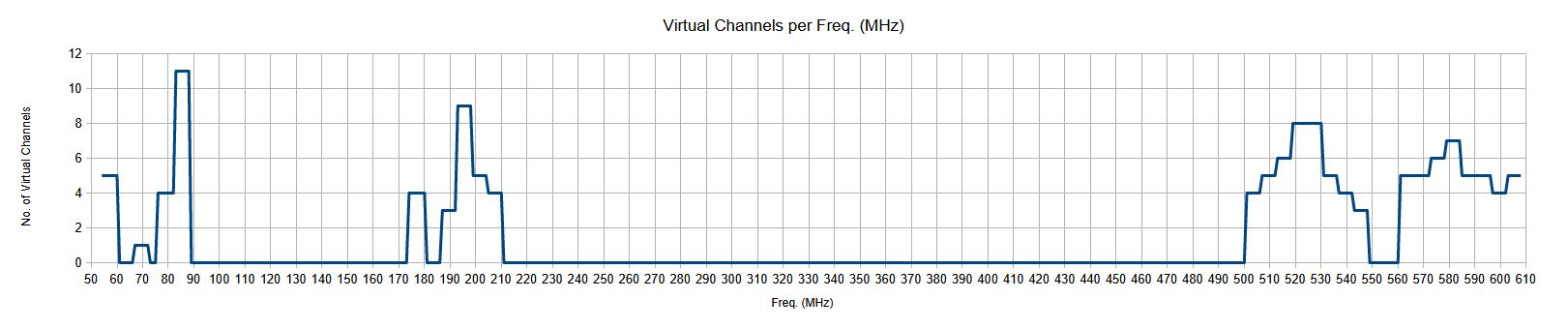
No site I know produces a frequency-analysis graph, telling users which parts of the spectrum are most important to them.
And these sites create problematic dependencies. (What would one do if, e.g., TV Fool disappeared tomorrow?)
None of these sites is a one-stop shop. Do-it-ourselvers often cobble together a picture from three or more of them.
The D.I.Y. Solution To This D.I.Y. Problem
Instead of providing one’s home address to strangers’ websites, one may use a local spreadsheet (downloads below).
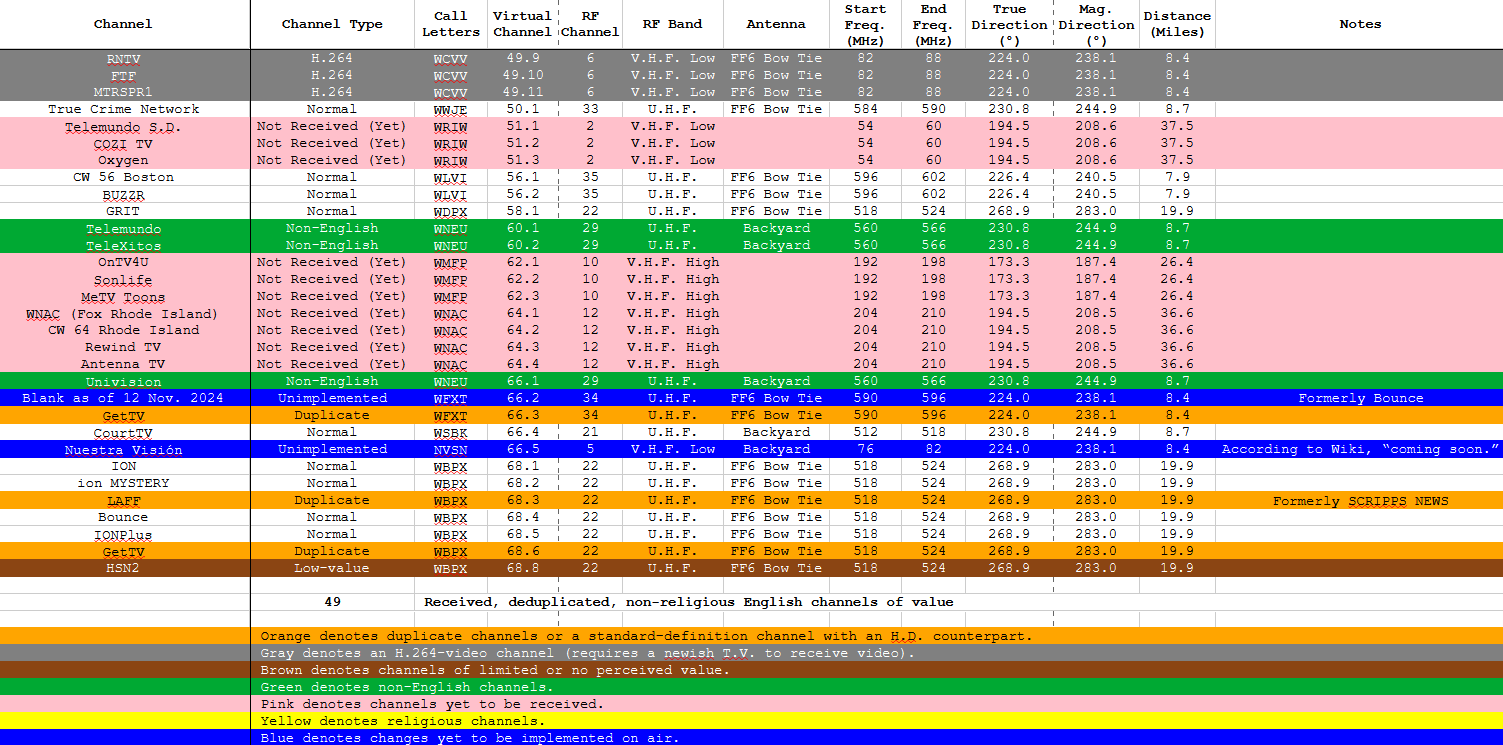
The spreadsheet I am providing charts stations by both magnetic and true compass bearings.
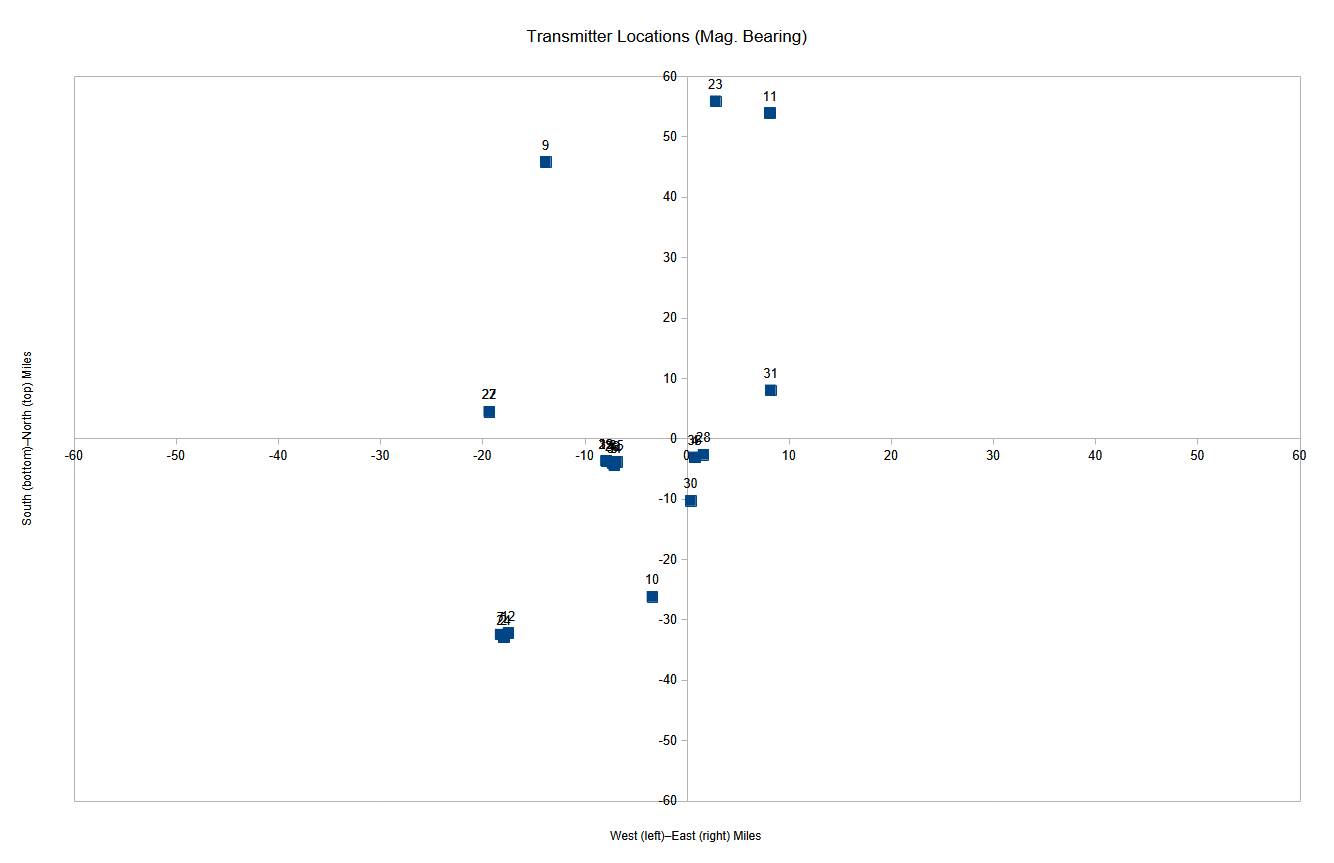

It also produces a chart of virtual channels per magnetic bearing.

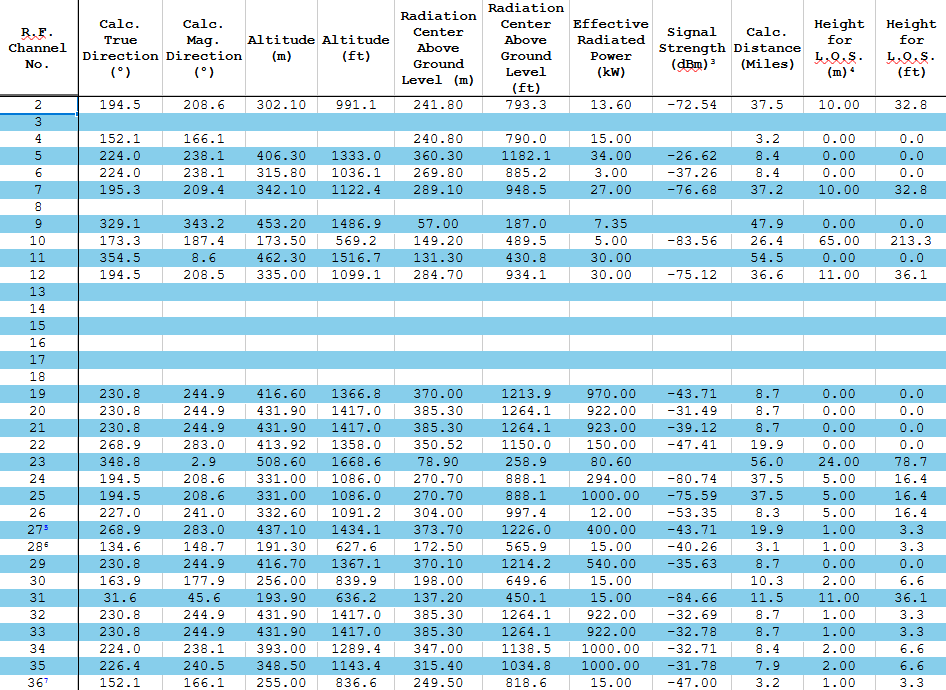
With some manual work, it allows you to compare possible mast heights.
And it produces graphs of 1) virtual channels per actual channel and 2) virtual channels per frequency.

The version downloadable, below, is primed for the center of Boston. Adjusting it for different locales is a manual process.
Customization Primer
To customize this spreadsheet for your location, proceed as follows.
Go to the Location Details sheet at the end of the workbook.
Place your precise Latitude in B1 (obtained from your favorite G.P.S. app or Google Maps). The spreadsheet will calculate your degrees, minutes and seconds.
Place your precise Longitude in B5. The spreadsheet will calculate your degrees, minutes and seconds.
Place your altitude in meters in B9 (obtained from a reliable G.P.S. or Google Earth). The spreadsheet will calculate your altitude in feet.
Place your magnetic declination in B11 (obtainable from the N.O.A.A.).
(Optional) Go to the Antennae sheet and list your antennae in column A.
Go to the Transmitters sheet.
Use the F.C.C.’s tool here to find your local stations, remembering that some may be listed as operating from neighboring states.
For each station, click on Facility Technical Details.
Scroll down to the channel’s antenna information, which includes its Latitude, Longitude, “ERP” (Effective Radiated Power), “RCAMSL” (Radiation Center Above Mean Sea Level) and “RCAGL” (Radiation Center Above Ground Level).
Note the channel number (this is the station’s real R.F. channel number).
(Optional but suggested) note the station’s Facility ID.
In the spreadsheet row for the station’s real channel number, place the whole number of degrees Latitude in column E, place the minutes and seconds Latitude in columns F and G, place the whole number of degrees Longitude in column H and the minutes and seconds Longitude in columns I and J. The spreadsheet will calculate the fractional degrees Latitude and Longitude in columns M and N, the true and magnetic bearings in columns O and R and the distance to the station in miles in column AA.
(Optional but suggested) enter the station’s F.C.C. Facility ID in column K.
(Optional) Select one of your antennae in column L.
In the same row, place the station’s “RCAMSL” in column U. The spreadsheet will calculate the station’s altitude in feet in column V.
In the same row, place the station’s “RCAGL” in column W. The spreadsheet will calculate the station’s radiation center above ground level in feet in column X.
(Optional) in the same row, place the station’s “ERP” in column Y.
(Optional) find your state, municipality and zip code on Channel Master’s site here.
For each (real) “RF Channel” on Channel Master’s list, enter the signal strength in the appropriate row in column Z.
(Optional) go to Scadacore’s R.F. line-of-sight tool here (this requires you give your location to Scadacore).
Input your Latitude and Longitude for Radio 1 and click “Plot GPS.”
For each transmitter in the worksheet, place its Latitude and Longitude (columns M and N) into the online tool for Radio 2 and click “Plot GPS.”
Once the site has loaded the intermediary terrain data, place the transmitter’s altitude in meters (column U) in the appropriate field for the Green Antenna.
Adjust the Blue Antenna’s height in the online tool to find the minimum height in meters for a clear line of sight and place that value in the appropriate row in column AC. The spreadsheet will calculate the height for line-of-sight in feet in column AD.
(Optional) hide columns E–J, P–Q and S–T.
Go to the Channels sheet.
Replace the channels in rows 2–132 with the channels available in your area. Changing the channel type (column B) will automatically update the row’s color and the received-channel count near the bottom. Changing the R.F. Channel (column E) will automatically update the R.F. band, antenna, start and end frequencies, magnetic and true directions and distance (columns F–L). If you found any new transmitters during the F.C.C. facility search, above, you may have to Google or use other tools to identify virtual channels you are yet to receive.
At this point, all the graphs should be updated.
Remember to save your work!
Downloads
The file may be downloaded under the Creative Commons by-attribution, non-commercial, share-alike 4.0 license in Excel format here or LibreOffice format here. (I saved in LibreOffice, so please let me know if you have any issues opening it in Excel.)